Welcome to the homepage of Shannon's Demon. The trading bot that grows the value of your crypto portfolio by repeatedly rebalancing your portfolio. For more information about the bot's trading strategy, please check: rebalancing-with-shannons-demon. Get your bot running in less than 5 minutes. For now only Binance is supported.
How the bot works... Let's start with a portfolio worth 1000 USD and trade BNB/USDT (market). Since we have to start with a perfectly balanced portfolio, we buy 500 USD worth of USDT (quote_asset_qty) and 500 USD worth of BNB (base_asset_qty). At a current price of of 20 BNBUSDT that is 25 BNB. This is also called the equilibrium price.
T0: 500.0 USDT + 25.00 BNB x 20.0 BNB/USDT = 1000.0 USDT.
At T1 the price decreases to 15.0 BNB/USDT and to be perfectly balanced again the bot buys 4.17 BNB in exchange for 62.5 USDT.
T1: 500.0 USDT + 25.00 BNB x 15.0 BNB/USDT = 875.0 USDT.
T1: Rebalance: buy 4.17 BNB.
T1: 437.5 USDT + 29.17 BNB x 15.0 BNB/USDT = 875.0 USDT.
At T2 the price increases to 20.0 BNB/USDT and to be perfectly balanced again the bot sells 3.65 BNB in exchange for 72.92 USDT.
T2: 437.50 USDT + 29.17 BNB x 20.0 BNB/USDT = 1020.8 USDT.
T2: Rebalance: sell 3.65 BNB.
T2: 510.42 USDT + 25.52 BNB x 20.0 BNB/USDT = 1020.8 USDT.
As you can see in the above example we have generated a small retrun of approximately 2%. Over time the bot generates many small returns which are immediately re-invested (similar to receiving compound interest, the 8th world wonder). This is also known as volatility harvesting and if there is plenty of something in the crypto space, it is volatility.
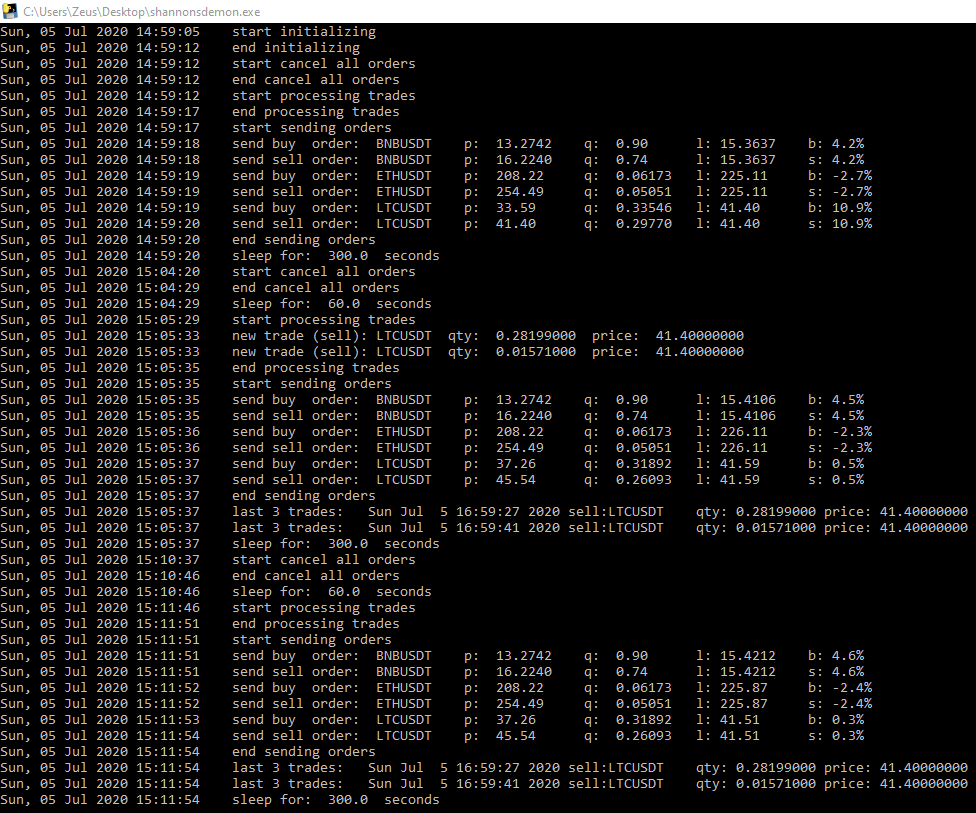
The given example is a simplified explanation of how the bot works. Actually it starts with sending orders at the equilibrium price multiplied by buy_percentage and sell_percentage. With these parameters equal to 0.9 and 1.1 that would be orders with price of 18 and 22 BNB/USDT at time T0. After waiting sleep_seconds_after_send_orders seconds, the bot cancels all open orders, processes all new (trade id > fromId) trades that were send with this bot and finally waits another sleep_seconds_after_cencel_orders seconds. Every rebalance_interval_sec seconds instead of sending orders at fixed percentages, the bot sends special orders. These special orders rebalance at the current price given that it's more than 5% away from equilibrium.
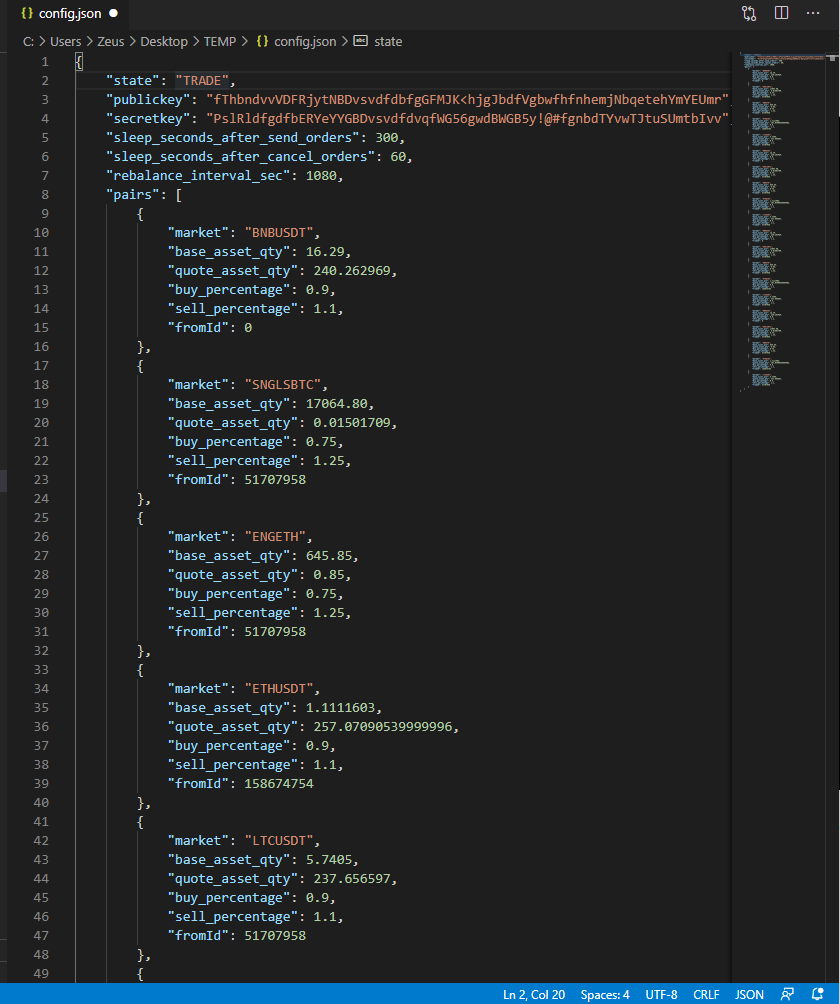
Prerequisites... Download shannonsdemon.exe and config.json and put both files in the same folder. If you don't trust running an executable, which you shouldn't if you don't have some sort of dedicated system, you can also clone the github repository and run the python script. Open a new account on Binance. Please use our link for a 20% discount in trading fees of which we receive half. Obviously you can also use an existing account. Create api keys and make sure to have trading option enabled and withdrawal option disabled. Fund your account, make sure you have the right quantities for every market you want to trade and set all parameters in the config.json file using for example Visual Studio Code.
How to start your bot... It is very important that you always start the bot with state unequal to TRADE (e.g. TEST) to check if the orders that are about to be send make sense. We advise you to always start your bot following the steps below until you know what you are doing:
1. Set state equal to TEST in config file. Start your bot by double clicking the executable or by running the python script. Wait until you see [end processing trades] in the ui and stop the bot. If you received any error messages you need to solve the errors first and restart the bot until it runs error free. Now all new trades are processed and fromId is updated if necessary.
2. Now you can increase or decrease the base_asset_qty and quote_asset_qty but make sure that all markets are close to equilibrium. Re-start the bot with state still equal to TEST and check if DUMMY order prices for all markets make sense. The [b:] and [s:] percentage are 0% if in equilibrium. If too far from equilibrium an error is thrown that an order would hit the market and most of the time you have made a mistake in quantities. After checking all markets you can stop the bot.
3. Change the state to TRADE and start your bot. After [end sending orders] you can sleep safe and get rich.
Debugging… Most error messages are self explanatory. However we want to mention all messages related to time sync. This means that the time of your computer is not in sync with the time of Binance’s servers. Sync your system’s clock in order to solve it. We have also seen that the time of the router needed to be synced. For all other error messages search Binance rest-api documentation. The bot uses Samm Chardy’s python-binance library. You can look there also. Don’t hesitate to contact us for any help.
Contact: shannonsdemon@outlook.com or https://discord.gg/mnkE4Xb.
Donate:
ETH: 0x13d55ca40ca3d008b7b0a0118d295f510410b60f
USDT: 0x13d55ca40ca3d008b7b0a0118d295f510410b60f
BTC: 1Fxyo5jfMxkDgGDjiAU9KE7svEG6Drriyv
LTC: Lbqi2McxsrhM2NR3FtgiMiF2JxswFBsmMX